Read more ->

 12 Min
A Registry Lock is the strongest protection available for your domains, applied at the registry itself rather than inside your registrar account. This guide explains how it works, how it differs from a Registrar or Transfer Lock, which domains need it, and when the added friction is worth it.

Registry Lock exists to protect your business-critical domains. A domain hijacking rarely announces itself and an attacker who phished your registrar credentials could repoint your primary domains, email and TSL/SSL certificates. A Registry Lock is the strongest measure of defense at registry-level for your most important domains. Unlike the account-level protections, it holds even when your registrar login has been compromised.
This guide explains what a Registry Lock is, how it works, how it differs from a Registrar or Transfer Lock, and how it fits into a layered domain security strategy. Find out how to handle it at InterNetX.
A Registry Lock is a security control applied directly at the registry, the organization that operates a TLD. It blocks any change to a domain until the request has been manually verified through a separate, out-of-band channel.
You might have heard of security measures at the registrar level. They usually live inside your account: passwords, multi-factor authentication, or Registrar Lock. A Registry Lock lives one level higher: at the registry. Since the lock sits above the registrar, it holds even if someone gets into your registrar account. Thus, a Registry Lock prevents unauthorized nameserver and DNS delegation changes, transfers to another registrar, changes to registrant or contact data, and deletion of the domain. Nothing can be changed until a pre-designated authorized person confirms the change through a manual process.
You shouldn’t have a Registry Lock on every domain within your domain portflio. It’s a security measure you should apply to a small numbers of domains: those you cannot afford to lose because they’re connected to business-critical assets.
The value of a Registry Lock becomes tangible when you look at how domain hijackings have played out for some businesses.
The business impact of losing a primary domain is critical. It can take down your website, redirect your corporate email, break the SSL/TLS trust chain that secures customer connections, and hand your brand to whoever now controls the DNS. But also customer data can be intercepted and payment flows can be diverted. Recovery is slow, and the damage to the brand is public. Our own guide on domain hijacking and what to do if it happens walks through just how difficult reclaiming a stolen domain can be.
The most recent IDC Global DNS Threat Report found that around 90% of organizations had experienced a DNS attack, at an average cost of roughly $1.1 million per incident. The threat is systemic, and the reason so many of these attacks succeed is that they target the one gap account-level security cannot close. The control that closes that gap is out-of-band verification at the registry. Exactly what a Registry Lock provides.
To understand the mechanics behind a Registry Lock, you need to know how registrars and registries talk to each other. They communicate using Extensible Provisioning Protocol (EPP). EPP is the standardized language, defined in IETF RFC 5731 for domain-name mapping, that a registrar uses to tell a registry to register, update, transfer, or delete a domain. When you change your nameservers in your control panel, your registrar translates that action into an EPP command and sends it to the registry. The registry checks the domain’s status codes and either executes the command or rejects it.
EPP status codes come in two families, and the difference between them is the difference between a Registrar Lock and a Registry Lock.
Because the registrar controls these codes, it can add or remove them automatically, often without any human in the process. That is convenient, and it is exactly why they cannot stop an attacker who is already inside your registrar account.
Your registrar cannot lift the server-side codes on its own. Only the registry can, and only after the out-of-band verification step.
The verification step is the core. When a legitimate change to a domain is needed, the request does not simply flow through the automated EPP pipeline. Instead, it triggers a manual authentication process. The registry, or the registrar acting under the registry’s authorization procedure, contacts a pre-designated authorized person through a separate channel. That contact is confirmed by callback, passphrase, or another agreed method before the lock is temporarily lifted so the change can be applied. Once the change is complete, the lock is re-applied.
There isn’t any automated process with credentials to change settings in a registry-locked domain. Stolen credentials get an attacker nowhere, because the last step is a human confirmation over a channel the attacker does not control.
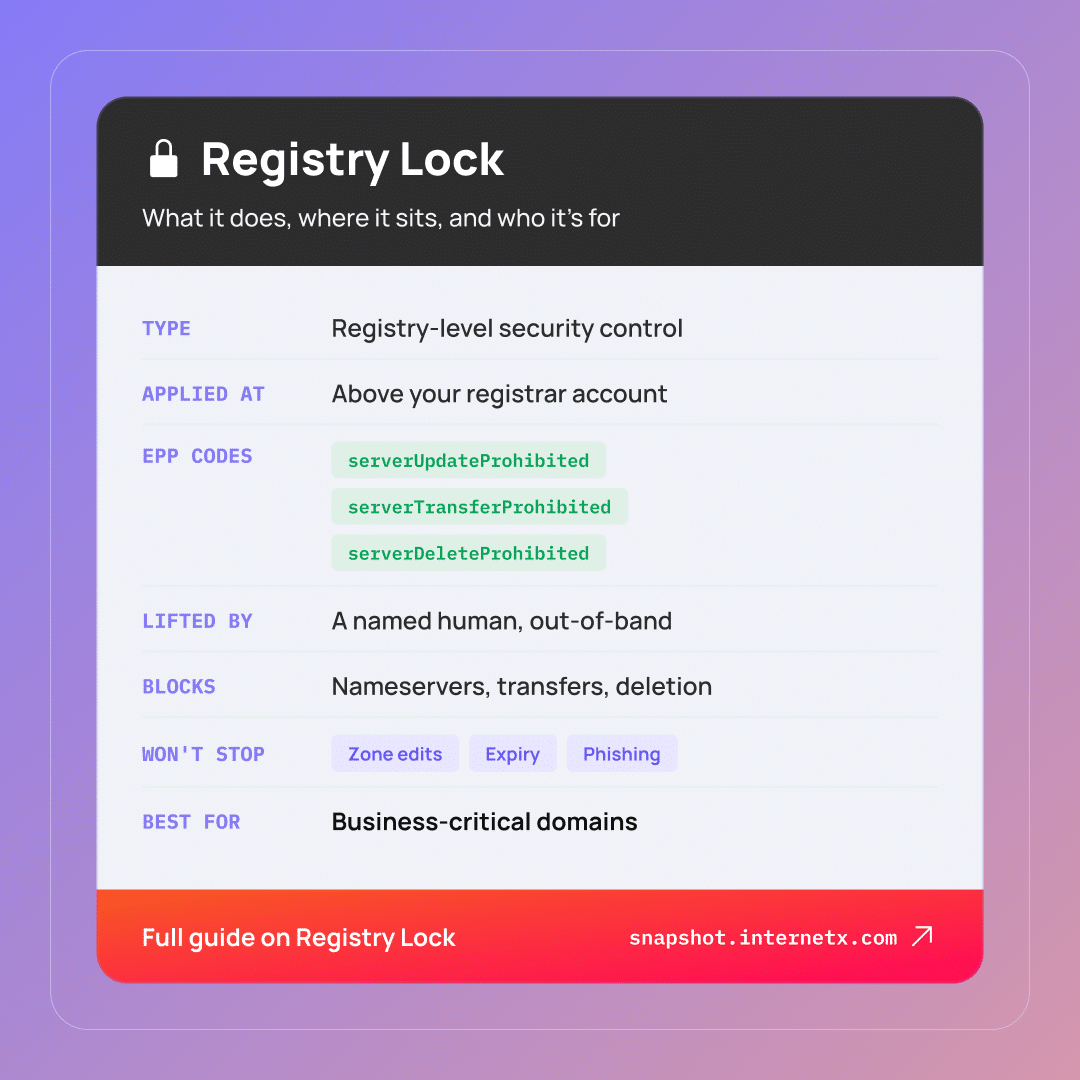
Since the terms are pretty similar, they could get confused, so it’s worth drawing the distinctions.
A Registrar Lock is the general term for the client-side status codes a registrar can set on your domain to prevent unwanted or accidental changes. A Transfer Lock falls under this category: it blocks a domain from being transferred to another registrar. Both are applied at the registrar level, inside your account, and both can be set and removed by the registrar, by default and at no extra cost. They are useful and should always be enabled. But they are account-level protections, which means anyone get access to your registrar account can lift them.
A Registry Lock is applied at the registry level using server-side codes that only the registry can remove, and only after manual out-of-band verification. While Registrar and Transfer Locks are automated and account-bound, a Registry Lock introduces a human checkpoint.
| – | Registrar/Transfer Lock | Registry Lock |
|---|---|---|
| Where it is applied | At the registrar, inside your account | At the registry, above the registrar |
| Who can remove it | The registrar, often automatically | Only the registry, after manual verification |
| Verification to change | None beyond account access | Out-of-band confirmation by a named contact |
| EPP status codes | clientTransferProhibited, clientUpdateProhibited, clientDeleteProhibited | serverTransferProhibited, serverUpdateProhibited, serverDeleteProhibited |
| Holds if the account is compromised | No | Yes |
| Best suited for | Every domain, as a baseline | Business-critical domains |
It’s important to apply them both in order to cover two different layers. Keep your Registrar and Transfer Locks on for every domain. Add Registry Lock on top for the domains you cannot afford to lose because they are connected to business-critical assets. The Registrar Lock is your baseline hygiene, and the Registry Lock is your last line of defense when everything else has been compromised.
It’s important to understand what a tool can do, and also what it cannot help you with, to avoid a false sense of security.
The boundary worth highlighting is the line between the registry-level record and the DNS zone your provider hosts. The registry knows which nameservers are authoritative for your domain, and that delegation is what a Registry Lock protects. The actual A/AAAA, MX, TXT, and other DNS records that direct traffic live in the zone your DNS provider manages and are secured by that account. If you want to understand exactly what lives where, our reference on the DNS records behind domains explains it in details.
Not every domain needs this level of protection. Look at this short checklist. Is your domain tied to any of the following?
If the answer to any of these is yes, the domain is a good candidate for Registry Lock.
Take a moment to consider also what you leave out. Parked domains, redirect-only registrations, defensive registrations, and low-value assets don’t justify such a service. Locking them adds cost and slows routine housekeeping without meaningfully reducing risk. If your domain portfolio is spread across registrars and spreadsheets, our guide to domain management tools shows how to bring it under centralized control first, because you cannot protect what you cannot see. For the broader strategic picture, our overview of domain management as a discipline frames how Registry Lock fits into a mature domain portfolio.
The availability of the Registry Lock depends on the TLD operator. A registrar can only offer Registry Lock for a given TLD if the registry behind that TLD supports it.
The most common and well-known is probably Verisign Registry Lock Service for .com and .net. Beyond that, a growing number of ccTLDs and new gTLDs offer equivalent services, sometimes under different names such as Domain Lock.
For anyone managing a mixed portfolio, two things are worth knowning. First, terminology, pricing, and the exact verification workflow differ from one registry to the next. A domain on .com, one on .at, and one on .de may each have a different process. Second, this diverse scenario can be tricky to manage across providers and TLDs. At InterNetX, our AutoDNS platform connects to hundreds of registries, and lets you check Registry Lock availability and provision it from one place.

Activating a Registry Lock is straightforward. Here is the process, in order.
You can verify a Registry Lock yourself by reading the domain’s public status record. Both WHOIS and its successor RDAP (Registration Data Access Protocol) expose the EPP status codes attached to a domain. Look for the three server-side codes. The presence of all three is the signal of an active Registry Lock. If you see only the client-side equivalents, the domain has a Registrar Lock, not a Registry Lock. For your domain portfolio, take a look at your provider’s dashboard. It should show you lock status across all your domains at once.
A quick caution: status display can vary slightly between registries and between WHOIS and RDAP output, so if the codes are absent from one source, check the RDAP record or your provider’s dashboard before concluding a lock is not in place.
A Registry Lock is a premium, manually operated service, and its pricing reflects that. It is typically charged per domain per year, and the exact figure varies by registry and provider. Because the numbers differ across TLDs, it’s best to confirm current pricing for the specific domains you want to protect.
The next useful question is whether the cost is worth it. Weigh the annual cost per domain against what losing a primary domain actually costs: interrupted revenue, a corporate email outage, the expense and disruption of incident response, potential data exposure, and lasting brand damage. For a critical domain, a Registry Lock should pay off.
Consider the operational friction as well. Changes to a registry-locked domain take longer, because they go through manual verification. For the right domains, it’s definitely worth it. For the wrong ones, it’s just needless drag.
Registry Lock is the strongest protection for your most important domains. Apply it as part of a broader defense approach, where each measure covers a different failure point:
For business-critical domains, a Registry Lock is the right choice: a security mechanism that uses out-of-band verification at the registry to keep your domains safe even after your registrar account has been compromised.
Protect your domains in AutoDNS

For most domains, yes. A Registrar or Transfer lock blocks accidental and low-effort changes and should stay on everywhere. But it lives inside your account, so anyone who gets into that account can lift it. For business-critical domains, add a Registry Lock on top.
A Registry Lock is an ongoing service, usually billed per domain per year, so it stays active as long as you keep it. Renewing the lock is separate from renewing the domain itself. Keep both current, because an expired domain can be lost no matter how well it is locked.
You cannot lift it from your account. A change request goes to the registry or your provider, which contacts a named authorized person out-of-band, by callback or passphrase, to confirm it. Once verified, the lock is lifted, the change is made, and the lock is reapplied.
To authorize changes on a locked domain you have to name a contact person. When a change is requested, this contact is notified and must confirm it, and needs to be reachable by both SMS and email. Changing the contact is handled in writing.
No. They solve different problems and work well together. A Registry Lock blocks unauthorized changes to your domain at the registry. DNSSEC uses cryptographic signatures so DNS answers cannot be forged in transit. One protects the record, the other protects its authenticity, so use both on critical domains.
When losing a domain would be a real crisis. A simple test: if the domain going dark for a day would trigger an emergency, lock it. If no one would notice for a week, it probably does not need one. Revenue, corporate email, and login domains are the usual candidates.